

Understanding themes is essential for anyone working with websites, applications, or digital interfaces. Whether you're customizing a WordPress site, building a mobile app, or designing a user interface, themes control how your digital content looks and feels to users. A theme is fundamentally a collection of design elements, templates, and styling instructions that determine the visual appearance and user experience of a digital platform. It's the difference between a bland, generic interface and one that reflects your brand identity and engages your audience effectively.

(https://dopetheme.com/2-Tables-De-Chevet-Table-De-Nuit-LED-Tiroir-Niches-654679/) theme showcase displaying various design styles and layouts]
What Is Theme?
A theme is a comprehensive design framework that controls the visual presentation and user interface of digital platforms like websites, applications, and software programs. Think of it as the digital equivalent of interior design for your online presence – it determines colors, fonts, layouts, navigation structures, and interactive elements that users see and interact with.
The Core Components of Themes
At its most basic level, a theme consists of several interconnected elements that work together to create a cohesive user experience. The visual styling includes color schemes, typography choices, spacing, and graphical elements that establish the overall aesthetic. Template structures define how content is organized and displayed across different pages or sections. Interactive elements determine how users navigate and engage with the interface, including buttons, menus, forms, and other clickable components.
Key Insight: A well-designed theme doesn't just look good – it enhances usability by creating intuitive navigation patterns and visual hierarchies that guide users naturally through your content.
Modern themes go beyond simple visual customization to include functionality and behavior patterns. They often incorporate responsive design principles that ensure consistent appearance across different devices and screen sizes. Many themes also include built-in features like social media integration, search functionality, contact forms, and e-commerce capabilities that extend the platform's core functionality.
Theme vs. Template: Understanding the Difference
While often used interchangeably, themes and templates serve different purposes in digital design. A template is typically a single page layout or design pattern that can be applied to specific content types. A theme, however, is a comprehensive system that includes multiple templates, styling rules, and often additional functionality that affects the entire platform or website.
Comparison of Theme Types
| Theme Type | Primary Use | Customization Level | Technical Skill Required |
|---|---|---|---|
| Pre-built Themes | Quick deployment | Limited to theme options | Minimal |
| Custom Themes | Unique brand identity | Complete control | High |
| Child Themes | Safe customization | Moderate flexibility | Moderate |
| Framework Themes | Developer foundation | Extensive | High |
The distinction becomes important when choosing the right approach for your project. Pre-built themes offer convenience and speed but may limit your ability to create a truly unique brand experience. Custom themes provide maximum flexibility but require significant development resources and expertise.
How Themes Work
Understanding how themes function behind the scenes helps you make better decisions about customization, maintenance, and troubleshooting. At their core, themes operate through a combination of styling languages, template files, and configuration settings that work together to transform raw content into polished, user-friendly interfaces.
The Technical Foundation
Most modern themes are built using a combination of HTML for structure, CSS for styling, and JavaScript for interactive functionality. In content management systems like WordPress, themes also incorporate PHP code that dynamically generates pages based on your content and settings. This multi-layered approach allows themes to be both flexible and powerful.
The styling cascade is a fundamental concept in how themes work. CSS (Cascading Style Sheets) rules are applied in a specific order of priority, with more specific rules overriding general ones. This allows theme developers to create comprehensive base styles while giving users the ability to make targeted customizations without breaking the overall design.
Pro Tip: Understanding CSS specificity can help you troubleshoot theme customization issues. When your custom styles aren't applying correctly, it's often because a more specific rule is overriding your changes.
Template Hierarchy and File Structure
Themes use a hierarchical template system that determines which design template is used for different types of content. For example, a blog post might use a different template than a product page or contact form. This hierarchy allows themes to provide appropriate layouts and functionality for various content types while maintaining design consistency.
The file structure of themes typically includes several key components:
- Style sheets: Define colors, fonts, spacing, and visual appearance
- Template files: Control page layouts and content organization
- Function files: Add custom functionality and features
- Asset files: Include images, icons, and other media elements
- Configuration files: Store theme settings and options
Dynamic Content Integration
Modern themes excel at integrating with dynamic content management systems. Rather than requiring manual updates to each page, themes can automatically apply consistent styling and layout to new content as it's created. This dynamic approach means that when you publish a new blog post or add a product to your e-commerce site, the theme automatically applies the appropriate design elements.
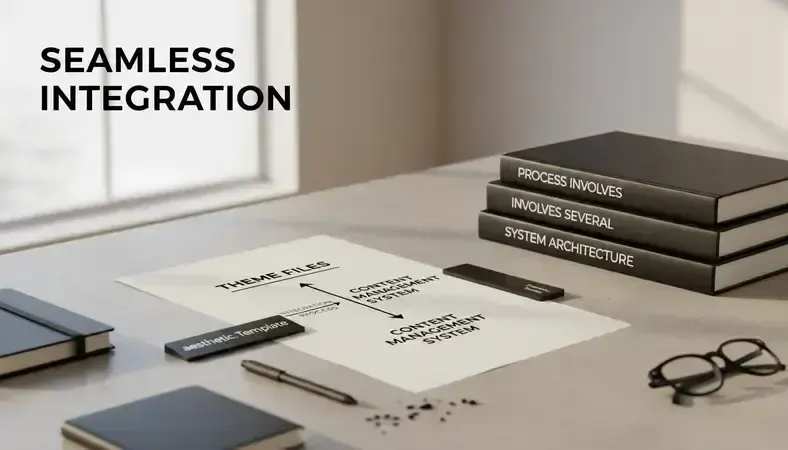
The integration process involves several steps that happen automatically when a user visits your site. The content management system identifies what type of content is being requested, selects the appropriate template from your theme, retrieves the relevant content from the database, and combines everything to generate the final page that users see.
Responsive Design Mechanisms
Contemporary themes incorporate responsive design principles that adapt layouts and styling based on the user's device and screen size. This adaptation happens through CSS media queries that apply different styling rules depending on screen width, device orientation, and other factors.
The responsive design process typically involves several breakpoints – specific screen widths where the layout changes to optimize the user experience. Common breakpoints include mobile phones (up to 768px), tablets (768px to 1024px), and desktop computers (1024px and above), though modern themes often use more nuanced breakpoint systems.
Key Components of Themes
Every effective theme comprises several essential components that work together to create a cohesive user experience. Understanding these components helps you evaluate themes more effectively and make informed decisions about customization and functionality requirements.
Visual Design Elements
The visual foundation of any theme starts with its color palette and typography system. Professional themes establish a primary color scheme that reflects brand identity while ensuring adequate contrast for accessibility. The typography system includes font families for headings, body text, and special elements, along with sizing hierarchies that create visual organization and improve readability.
Layout and spacing systems provide the structural foundation for content organization. Grid systems help maintain consistent alignment and proportions across different page types. Whitespace usage affects both visual appeal and content comprehension, with well-designed themes balancing information density with breathing room.
Design Principle: The best themes follow the 60-30-10 color rule: 60% dominant color (usually neutral), 30% secondary color (brand color), and 10% accent color (for highlights and calls-to-action).
Navigation and User Interface Components
Navigation systems are critical components that determine how users move through your site or application. Primary navigation typically includes main menu structures, breadcrumb systems, and search functionality. Secondary navigation might include sidebar menus, footer links, and contextual navigation elements that appear based on user location or content type.
Interactive elements include buttons, forms, modal windows, and other components that users directly engage with. Consistent styling and behavior patterns for these elements create a predictable user experience that reduces cognitive load and improves usability.
Content Organization Features
Modern themes include sophisticated content organization capabilities that go beyond basic page layouts. Category and tag systems help organize and display related content. Archive pages provide ways to browse content chronologically or by topic. Featured content areas allow you to highlight important information or popular items.
Content formatting options determine how different types of media and information are displayed. This includes support for various content types like:
- Text content: Articles, descriptions, and informational pages with proper typography hierarchy
- Image galleries: Slideshow, grid, and masonry layouts for visual content
- Video integration: Embedded players and responsive video containers
- Interactive elements: Contact forms, comment systems, and user engagement features
- E-commerce components: Product displays, shopping carts, and checkout processes
Customization and Configuration Systems
Theme customization capabilities vary significantly between different platforms and theme types. Basic customization options typically include color scheme modifications, font selections, and logo uploads. Advanced customization might include layout modifications, custom CSS injection, and widget or module management.
Configuration systems allow users to modify theme behavior without editing code directly. These might include options for enabling or disabling features, setting up social media integration, configuring SEO elements, and managing performance optimization settings.
Benefits and Use Cases of Themes
Themes provide substantial advantages for both developers and end users, making professional-quality design accessible without requiring extensive technical expertise. Understanding these benefits helps you appreciate why themes have become the standard approach for most digital design projects.
Time and Cost Efficiency
The primary benefit of using themes is the dramatic reduction in development time and costs. Instead of building a design system from scratch, which can take weeks or months, themes allow you to deploy professional-looking interfaces in hours or days. This efficiency is particularly valuable for small businesses, startups, and individuals who need quality results without large development budgets.
Pre-built themes eliminate much of the trial-and-error process associated with design development. Professional theme developers have already solved common design challenges, tested layouts across different devices, and optimized performance. This means you benefit from their expertise and experience without having to replicate their work.
Cost Comparison: Custom website development typically costs $5,000-$50,000+ and takes 2-6 months, while premium themes cost $50-$200 and can be deployed in 1-3 days with similar visual quality.
Professional Quality and Design Standards
High-quality themes are created by professional designers who understand current design trends, usability principles, and technical best practices. This means even users without design training can achieve professional results that would otherwise require hiring specialists.
Modern themes incorporate industry standards for accessibility, ensuring that your content is usable by people with disabilities. They also follow responsive design principles, providing optimal experiences across all device types. Security considerations are built into well-developed themes, protecting your site from common vulnerabilities.
Specific Use Cases and Applications
Different industries and use cases benefit from theme-based approaches in unique ways:
Small business websites: Local businesses can quickly establish professional online presence without significant investment. Restaurant themes include menu displays and reservation systems. Service-based businesses get contact forms and service showcases. Retail businesses benefit from e-commerce integration and product catalogs.
Content publishers: Bloggers and content creators use themes optimized for readability and content discovery. Magazine-style themes organize large amounts of content effectively. Portfolio themes showcase creative work with image-focused layouts.
E-commerce Ventures: Online stores benefit from themes specifically designed for product sales. These include shopping cart integration, product comparison features, customer review systems, and payment processing capabilities.
Corporate and Professional Services: Business themes provide the credibility and functionality needed for professional organizations. They often include team member profiles, service descriptions, case studies, and client testimonial sections.
Scalability and Maintenance Advantages
Quality themes are designed to grow with your needs. Modular architecture allows you to add functionality as your requirements evolve. Regular theme updates from developers ensure compatibility with platform updates and security patches.
The community aspect of popular themes provides ongoing support and resources. User communities share customization tips, troubleshooting advice, and enhancement ideas. This collective knowledge base helps users maximize their theme investment and solve problems quickly.
Maintenance Benefit: Theme updates often include performance improvements, security patches, and new features automatically, reducing the ongoing maintenance burden compared to custom-built solutions.
Common Misconceptions About Themes
Despite their widespread use and proven benefits, several misconceptions persist about themes that can lead to poor decision-making or unrealistic expectations. Understanding these misconceptions helps you approach theme selection and customization with appropriate expectations.
"All Themes Look the Same"
One of the most persistent myths is that using themes results in generic, cookie-cutter websites that lack personality or uniqueness. This misconception stems from seeing multiple sites using the same popular theme with minimal customization. In reality, themes provide a foundation that can be extensively customized to reflect individual brand identity and requirements.
Professional themes include comprehensive customization options that allow for significant visual and functional modifications. Color schemes, typography, layout arrangements, and content organization can all be adjusted to create unique appearances. Many themes also support custom CSS and advanced customization techniques that enable virtually unlimited design possibilities.
Reality Check: The most successful websites often use modified versions of popular themes. The key is in the customization and content strategy, not the theme's base design.
"Free Themes Are Always Inferior"
While premium themes often offer more features and support, many high-quality free themes are available that provide excellent functionality and design. The WordPress.org repository, for example, includes thousands of free themes that meet strict quality standards. Many are developed by reputable companies as marketing tools for their premium offerings.
The key differences between free and premium themes typically relate to support level, customization options, and included features rather than basic quality. Free themes may have limited documentation or support channels, but they're often perfectly adequate for straightforward websites with standard requirements.
"Themes Automatically Handle SEO"
Another common misconception is that choosing an "SEO-friendly" theme automatically improves search engine rankings. While themes can include technical elements that support SEO (like clean code, fast loading times, and mobile responsiveness), they don't create content or implement SEO strategies.
SEO success depends primarily on content quality, keyword strategy, technical optimization, and user experience factors. A well-coded theme provides a solid foundation for SEO efforts, but it doesn't replace the need for proper SEO planning and execution.
"Theme Customization Requires Coding Skills"
Many users avoid theme customization because they believe it requires extensive programming knowledge. Modern themes include user-friendly customization interfaces that allow significant modifications through visual editors and settings panels. Drag-and-drop page builders, color pickers, and font selectors make customization accessible to non-technical users.
While advanced customizations may require some coding knowledge, most users can achieve their desired results using built-in customization tools. Many themes also include extensive documentation and tutorials that guide users through common customization tasks.
"More Features Always Mean Better Themes"
Feature-heavy themes might seem more valuable, but they can actually be counterproductive for many use cases. Excessive features can slow down loading times, create security vulnerabilities, and make the interface unnecessarily complex. The best theme for your project includes the features you need without unnecessary bloat.
Performance Impact: Themes with unused features can increase page load times by 2-5 seconds, significantly impacting user experience and search engine rankings.
Best Practices for Theme Selection and Implementation
Choosing and implementing the right theme requires careful consideration of your specific needs, technical requirements, and long-term goals. Following established best practices helps ensure successful theme deployment and ongoing satisfaction with your choice.
Evaluation Criteria for Theme Selection
Start your theme selection process by clearly defining your requirements and priorities. Consider your content types, functionality needs, design preferences, and technical constraints. Create a checklist of must-have features versus nice-to-have options to guide your evaluation process.
Technical considerations should include loading speed, mobile responsiveness, browser compatibility, and code quality. Check theme demos on various devices and internet connection speeds. Review the theme's update history and developer reputation to assess long-term viability.
Essential Evaluation Factors:
- Performance metrics: Page load speed, mobile optimization, and resource usage
- Customization flexibility: Available options for colors, fonts, layouts, and functionality
- Support quality: Documentation, tutorials, and developer responsiveness
- Update frequency: Regular updates indicate active development and security maintenance
- User reviews: Real-world experiences from other users in similar situations
- Compatibility: Works with your platform version and required plugins or extensions
Implementation Strategy
Plan your theme implementation carefully to minimize disruptions and ensure smooth deployment. If you're replacing an existing theme, create a complete backup and test the new theme in a staging environment before making it live. This allows you to identify and resolve compatibility issues without affecting your live site.
Content migration requires special attention when changing themes. Different themes may handle content types differently, potentially affecting how your existing content appears. Review all your important pages and posts after theme installation to ensure proper display and functionality.
Implementation Tip: Always test your new theme with real content, not just demo content. Lorem ipsum text and stock photos don't reveal how your actual content will look and function.
Customization Best Practices
Approach theme customization systematically, starting with major elements like colors and fonts before moving to detailed adjustments. Document your customizations to make future updates and troubleshooting easier. Use child themes when possible to preserve your customizations during theme updates.
Avoid over-customization that defeats the purpose of using a theme. If you find yourself making extensive modifications to core theme files, consider whether a different theme or custom development might be more appropriate for your needs.
Maintenance and Updates
Establish a regular maintenance routine that includes theme updates, backup creation, and performance monitoring. Theme updates often include security patches and new features, but they can also introduce changes that affect your customizations. Test updates in a staging environment before applying them to your live site.
Monitor your site's performance regularly to ensure your theme continues to meet your needs as your content and traffic grow. Page load times, mobile usability, and user engagement metrics can indicate when theme optimization or replacement might be necessary.
Maintenance Schedule: Check for theme updates monthly, perform full site backups before major updates, and review site performance quarterly to identify optimization opportunities.
Common Questions About Themes
What's the difference between free and premium themes?
Free themes typically offer basic functionality and design options with limited support and documentation. They're perfect for simple websites or users just starting out. Premium themes usually include more customization options, additional features, priority support, and regular updates. The choice between free and premium depends on your specific needs, budget, and required support level.
Premium themes often include advanced features like drag-and-drop page builders, e-commerce integration, and specialized layouts for different industries. They also typically receive more frequent updates and have dedicated support teams to help with technical issues. However, many free themes are perfectly adequate for straightforward websites with standard requirements.
Can I switch themes without losing my content?
Your content (posts, pages, media files) is stored separately from your theme, so switching themes won't delete your content. However, the way your content appears may change significantly because different themes have different layouts, styling, and organizational structures. Some theme-specific elements like custom widgets, specialized post types, or unique formatting may not transfer properly to a new theme.
Before switching themes, create a complete backup of your site and test the new theme thoroughly. Check all your important pages, contact forms, and special features to ensure they work correctly with the new theme. You may need to reconfigure some settings or make content adjustments to optimize the appearance with your new theme.
How do I know if a theme is mobile-friendly?
Modern themes should be responsive, meaning they automatically adjust their layout and styling for different screen sizes. Test potential themes by viewing their demos on various devices or using browser developer tools to simulate mobile screens. Look for features like touch-friendly navigation, readable text sizes, and properly sized buttons and links.
Check the theme's documentation or feature list for specific mentions of mobile optimization or responsive design. Many theme marketplaces also indicate whether themes are mobile-friendly in their listings. Google's Mobile-Friendly Test tool can evaluate how well a theme performs on mobile devices once it's installed.
What should I do if my theme conflicts with plugins?
Theme and plugin conflicts can cause functionality issues or visual problems on your site. Start troubleshooting by deactivating all plugins and checking if the issue persists. If the problem disappears, reactivate plugins one by one to identify the conflicting plugin. Sometimes updating either the theme or plugin resolves compatibility issues.
If conflicts persist, check with both the theme and plugin developers for known compatibility issues and solutions. Many popular themes maintain lists of tested plugins and known conflicts. Consider switching to alternative plugins that provide similar functionality but are more compatible with your theme.
How often should I update my theme?
Theme updates should be applied regularly to maintain security, compatibility, and functionality. Check for updates monthly and apply them promptly, especially security-related updates. However, always test updates in a staging environment first, particularly if you've made customizations to your theme.
Major theme updates that introduce significant changes should be approached more cautiously. Review the changelog to understand what's changing and how it might affect your site. If you've heavily customized your theme, major updates might require additional work to maintain your customizations.
Can I customize a theme without coding knowledge?
Most modern themes include user-friendly customization interfaces that don't require coding skills. These typically include color pickers, font selectors, layout options, and drag-and-drop page builders. Many themes also integrate with popular page builder plugins that provide visual editing capabilities.
For basic customizations like changing colors, fonts, or adding your logo, theme customization panels are usually sufficient. More advanced modifications might require some CSS knowledge, but many themes include extensive documentation and tutorials to guide non-technical users through common customization tasks.
Conclusion
Themes represent a fundamental shift in how we approach digital design, making professional-quality interfaces accessible to users regardless of their technical expertise. Understanding what themes are, how they work, and how to implement them effectively empowers you to create compelling digital experiences that serve your specific needs and goals. The key to theme success lies in choosing the right foundation for your project and customizing it thoughtfully to reflect your unique brand and requirements.
Ready to explore professional theme options for your next project? Discover premium themes at Dope Theme and transform your digital presence today.