

A website theme is a lot easier to understand than you might think. Forget the complex technical jargon about CSS files and PHP templates. You can think of a theme as your website's complete visual makeover kit, usually containing everything from colors and fonts to layout structures and interactive elements. Whether you're building a business website, personal blog, or e-commerce store, choosing the right theme sets the foundation for your entire online presence.

(https://dopetheme.com/on-Avec-Pirate-Accessoires-Chapeau-Compass-Bandana-Carnaval-500399/) theme showcase displaying various modern layouts and design styles]
What Is a Website Theme
A website theme is a pre-designed template that determines how your website looks and functions. Think of it as a complete package that includes your site's visual design, layout structure, color schemes, typography, and often interactive features. Unlike basic templates, modern themes are sophisticated systems that control every aspect of your site's appearance while maintaining flexibility for customization.
Core Components of Website Themes
Every professional website theme contains several essential elements that work together to create a cohesive user experience. The visual design layer includes color palettes, typography choices, spacing, and overall aesthetic direction. The structural framework defines how content is organized, where navigation appears, and how different page elements relate to each other.
The functionality layer encompasses interactive features like contact forms, image galleries, social media integration, and e-commerce capabilities. Many modern themes also include customization options through theme customizers, allowing you to modify colors, fonts, and layouts without touching code.
Why It Matters: Understanding these components helps you evaluate themes more effectively and choose one that aligns with your specific needs and technical comfort level.
Types of Website Themes
Website themes fall into several distinct categories, each serving different purposes and audiences. Multi-purpose themes offer maximum flexibility with dozens of pre-built layouts and extensive customization options. These themes work well for agencies or businesses that need to create diverse website types.
Niche-specific themes are designed for particular industries or use cases, such as restaurants, photography portfolios, or online courses. These themes include specialized features and design elements tailored to specific business needs. Minimalist themes focus on clean, simple designs with essential features, perfect for blogs or professional portfolios.
Theme Architecture and Technology
Modern website themes are built on sophisticated frameworks that separate content from presentation. The template hierarchy determines which template file displays different types of content, while style sheets control visual presentation. PHP functions handle dynamic content generation and database interactions.
Most professional themes use responsive design principles, ensuring your website looks great on all devices. This involves flexible grid systems, scalable images, and adaptive typography that adjusts to different screen sizes automatically.
How Website Themes Work
Website themes operate through a sophisticated system of files and functions that transform raw content into polished web pages. When someone visits your website, the theme's template files pull content from your database, apply styling rules, and generate the final HTML that browsers display.
The Theme Loading Process
The process begins when a user requests a page from your website. The web server identifies which theme is active and locates the appropriate template file for that specific page type. Template files contain a mixture of HTML structure, PHP functions, and placeholder tags that tell the system where to insert content.
The theme's functions.php file loads first, registering menus, widget areas, and custom features. Next, the style.css file applies visual formatting, while JavaScript files add interactive functionality. This coordinated loading ensures all theme components work together seamlessly.
Key Insight: The loading order matters significantly for performance. Well-coded themes optimize this process to minimize loading times and improve user experience.
Template Hierarchy System
Website themes use a hierarchical system to determine which template displays different types of content. For a blog post, the system first looks for a specific post template, then falls back to a general single post template, and finally uses the index template if nothing else is available.
This template cascade provides flexibility while maintaining consistency. You can create specialized templates for specific content types while ensuring everything has a fallback option. The hierarchy includes templates for home pages, individual posts, category archives, search results, and error pages.

Content Integration Methods
Themes integrate with your content through several mechanisms. Dynamic content areas use PHP functions to pull information from your database and display it according to the theme's design. Widget areas provide flexible spaces where you can add various content blocks without modifying template files.
Custom fields allow themes to capture and display additional information beyond standard content. Many modern themes include page builders or customization panels that let you modify layouts and content placement through user-friendly interfaces.
Responsive Design Implementation
Modern themes implement responsive design through flexible grid systems that adapt to different screen sizes. CSS media queries apply different styling rules based on device characteristics, while flexible images scale appropriately without breaking layouts.
The mobile-first approach means themes are designed for small screens first, then enhanced for larger displays. This ensures optimal performance on mobile devices, which now represent the majority of web traffic.
Key Components of Professional Website Themes
Professional website themes consist of multiple interconnected components that work together to create cohesive, functional websites. Understanding these elements helps you evaluate themes effectively and make informed decisions about customization and functionality.
Design and Visual Elements
The visual foundation includes color schemes, typography systems, spacing guidelines, and overall aesthetic direction. Professional themes use consistent color palettes with primary, secondary, and accent colors that complement each other across all design elements.
Typography systems go beyond simple font choices to include heading hierarchies, body text formatting, and specialized text treatments for quotes, captions, and call-to-action elements. Spacing and layout grids ensure visual consistency and professional appearance across all pages.
Imagery systems define how photos, graphics, and icons integrate with the overall design. This includes aspect ratios, overlay treatments, and responsive behavior for different screen sizes.
Pro Tip: Look for themes that include style guides or design systems documentation. This indicates thoughtful design planning and makes customization much easier.
Functional Components and Features
Beyond visual design, professional themes include robust functional components. Navigation systems encompass main menus, footer navigation, breadcrumbs, and mobile menu implementations. Well-designed themes ensure navigation remains intuitive across all device types.
Content management features include post formats, custom post types, archive layouts, and search functionality. Many themes integrate with popular plugins to extend functionality without compromising performance or design consistency.
Interactive elements such as contact forms, image galleries, sliders, and social media integration are built with user experience and accessibility in mind. Professional themes ensure these features work reliably across different browsers and devices.
Customization and Flexibility Options
Modern professional themes provide extensive customization options without requiring coding knowledge. Theme customizers offer real-time preview capabilities, allowing you to see changes instantly as you modify colors, fonts, and layouts.
Page builder compatibility enables drag-and-drop content creation, while custom widget areas provide flexible content placement options. Header and footer builders let you create unique layouts for these critical areas without touching template files.
Advanced customization options include custom CSS panels, child theme support, and developer-friendly hooks and filters for programmatic modifications.
Performance and Technical Architecture
Professional themes prioritize performance through optimized code structures that minimize HTTP requests and reduce file sizes. Lazy loading for images and conditional script loading ensure fast page speeds without sacrificing functionality.
SEO optimization includes proper HTML structure, schema markup support, and clean URL generation. Security features protect against common vulnerabilities while maintaining compatibility with security plugins.
Browser compatibility ensures consistent appearance and functionality across different browsers and versions, while accessibility features make websites usable for people with disabilities.
Benefits and Use Cases for Website Themes
Website themes offer significant advantages for businesses and individuals looking to establish professional online presences. Understanding these benefits helps you leverage themes effectively and choose options that align with your specific goals and requirements.
Understanding the theme of anxiety, particularly in academic settings, is crucial for developing effective coping strategies. For those grappling with the pressures of exams, exploring the nuances of this experience can be enlightening. A helpful resource on this topic is the guide on What Is Exam Anxiety?, which offers insights and strategies to manage such stressors effectively.
Time and Cost Efficiency Benefits
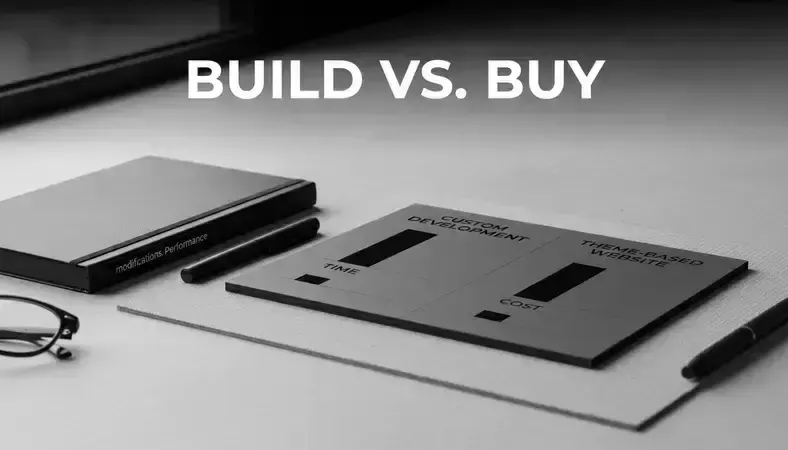
Using professionally designed themes dramatically reduces website development time compared to custom coding. Rapid deployment becomes possible because themes include pre-built layouts, styling, and functionality that would otherwise take weeks or months to develop from scratch.
Cost savings are substantial, especially for small businesses and startups. Professional custom website development can cost thousands of dollars, while premium themes typically cost under $100 and include features that would be expensive to develop individually.
Maintenance efficiency improves because theme developers handle updates, security patches, and compatibility issues. This ongoing support reduces the technical burden on website owners and ensures long-term reliability.
Key Takeaway: Themes democratize professional web design by making sophisticated layouts and features accessible to users without extensive technical knowledge or large budgets.
Professional Design and Functionality
Quality themes provide access to professional design standards that individual users might struggle to achieve independently. This includes proper typography hierarchies, color theory application, and user experience best practices developed through extensive testing and refinement.
Advanced functionality comes built-in with many themes, including e-commerce capabilities, portfolio galleries, booking systems, and membership features. These complex systems would require significant development time and expertise to create from scratch.
Mobile optimization is handled automatically, ensuring your website performs well on smartphones and tablets without additional development work. This mobile-first approach is crucial for modern web success.
Specific Industry Applications
Different industries benefit from specialized theme features designed for their unique needs. E-commerce businesses leverage themes with product catalogs, shopping carts, payment integration, and inventory management features.
Creative professionals benefit from portfolio themes that showcase visual work effectively, including photography galleries, video integration, and client proofing systems. Service-based businesses use themes with appointment booking, service listings, and client testimonial features.
Content creators and bloggers utilize themes optimized for readability, social sharing, and audience engagement, while educational organizations benefit from themes with course management, event calendars, and student portal functionality.
Scalability and Growth Considerations
Professional themes support business growth through scalable architectures that handle increased traffic and content without performance degradation. Modular design systems allow you to add new sections and features as your business expands.
Multi-language support enables international expansion, while SEO optimization helps improve search engine rankings over time. Integration capabilities with popular plugins and services ensure your website can evolve with changing business needs.
Performance optimization features like caching compatibility and code efficiency help maintain fast loading times even as your website grows in size and complexity.
Common Mistakes and Misconceptions About Website Themes
Many website owners make critical errors when selecting and implementing themes, often stemming from misconceptions about how themes work and what to expect. Understanding these common pitfalls helps you make better decisions and avoid costly mistakes.
Theme Selection Mistakes
One of the most frequent errors is choosing themes based solely on appearance without considering functionality, performance, or long-term maintenance requirements. A visually appealing theme that lacks proper coding standards or regular updates can become a liability over time.
Feature overload represents another common mistake. Many users select themes packed with dozens of features they'll never use, leading to slower loading times and unnecessary complexity. This "more is better" mentality often results in bloated websites that perform poorly.
Ignoring mobile responsiveness remains surprisingly common, despite mobile traffic representing the majority of web visits. Some users focus exclusively on desktop appearance without testing how themes perform on smartphones and tablets.
Expert Tip: Always test themes on multiple devices and screen sizes before making final decisions. What looks great on a large desktop monitor might be unusable on a smartphone.
Customization and Implementation Errors
Over-customization can destroy a theme's design integrity and create maintenance nightmares. Making extensive modifications without understanding the underlying structure often leads to broken layouts when themes update.
Plugin conflicts occur when users install multiple plugins that perform similar functions or conflict with theme features. This can cause functionality issues, security vulnerabilities, and performance problems that are difficult to diagnose.
Ignoring child themes when making customizations means losing all modifications when themes update. This fundamental oversight causes countless hours of rework and frustration for website owners.
Performance and Technical Misconceptions
Many users believe that premium themes automatically guarantee better performance, but this isn't necessarily true. Some expensive themes are poorly coded and perform worse than well-designed free alternatives.
Assuming themes handle all SEO requirements is another dangerous misconception. While good themes provide SEO-friendly structures, they don't automatically optimize content, meta descriptions, or other crucial ranking factors.
Neglecting regular updates stems from the false belief that themes don't need maintenance once installed. Outdated themes become security vulnerabilities and may break when WordPress or other platforms update.
Design and User Experience Mistakes
Copying popular websites exactly without considering your specific audience and goals often leads to poor user experiences. What works for one business may be completely inappropriate for another.
Ignoring loading speed in favor of visual effects and animations can severely impact user experience and search engine rankings. Many users prioritize flashy features over fundamental performance requirements.
Poor content organization occurs when users don't adapt theme layouts to their specific content needs. Using every available widget area or page section just because it exists often creates cluttered, confusing websites.
Best Practices and Expert Tips for Website Themes
Implementing website themes successfully requires following established best practices that ensure optimal performance, maintainability, and user experience. These expert strategies help you maximize your theme investment and avoid common pitfalls.
Theme Selection and Evaluation Criteria
Research theme developers thoroughly before making purchases. Established developers with strong track records provide better long-term support, regular updates, and higher code quality. Look for developers who maintain multiple successful themes and have positive community reputations.
Evaluate code quality by checking theme validation, performance scores, and compatibility with current web standards. Well-coded themes load faster, rank better in search engines, and experience fewer conflicts with plugins and updates.
Test thoroughly before committing by installing themes on staging sites or using demo environments. Test all major features, check mobile responsiveness, and verify compatibility with your essential plugins before making final decisions.
Pro Tip: Create a checklist of your must-have features and nice-to-have elements before browsing themes. This prevents getting distracted by flashy features you don't actually need.
Implementation and Customization Strategies
Always use child themes when making customizations to preserve your changes during theme updates. Child themes inherit parent theme functionality while allowing safe modifications to styling and functionality.
Plan your content strategy before implementing themes. Understanding your content types, page structures, and user journeys helps you choose appropriate theme features and layout options.
Optimize images and media according to theme specifications. Each theme has optimal image sizes and formats that ensure the best visual presentation and loading performance.
Customize gradually rather than making extensive changes all at once. This approach helps you understand how modifications affect overall site performance and user experience.
Performance Optimization Techniques
Minimize plugin usage by leveraging built-in theme features whenever possible. Each additional plugin adds overhead and potential conflict points, so use themes that include your essential functionality.
Configure caching properly to work with your chosen theme. Different themes have varying caching requirements and compatibility considerations that affect performance optimization strategies.
Optimize for Core Web Vitals by choosing themes that prioritize loading speed, interactivity, and visual stability. These Google ranking factors increasingly influence search engine performance.
Maintenance and Long-term Management
Establish regular update schedules for themes, plugins, and core platform updates. Staying current with updates prevents security vulnerabilities and ensures continued compatibility.
Monitor performance metrics regularly using tools like Google PageSpeed Insights and GTmetrix. Performance can degrade over time due to content growth, plugin additions, or hosting changes.
Backup before major changes including theme updates, customizations, or plugin installations. Regular backups provide safety nets when modifications don't work as expected.
Document customizations thoroughly so you or future developers can understand modifications and maintain the website effectively. This documentation becomes invaluable during troubleshooting or redesign projects.
Common Questions About Website Themes
What's the difference between free and premium website themes?
Free themes provide basic functionality and design options suitable for simple websites or those with limited budgets. They typically include essential features like responsive design, basic customization options, and standard layouts. However, free themes often have limited support, fewer customization options, and may include developer credits or links you cannot remove.
Premium themes offer extensive customization options, professional design quality, dedicated customer support, and regular updates. They frequently include advanced features like page builders, e-commerce integration, and specialized functionality for specific industries. Premium themes also provide better documentation, video tutorials, and ongoing developer support.
The investment in premium themes often pays off through time savings, professional appearance, and reduced development costs. However, free themes can be excellent choices for personal blogs, non-profit organizations, or businesses testing concepts before committing to larger investments.
Key Takeaway: Choose based on your specific needs, technical comfort level, and long-term goals rather than price alone. A well-designed free theme may serve you better than a feature-heavy premium theme you can't effectively utilize.
How do I know if a theme will work with my existing plugins?
Theme and plugin compatibility requires careful evaluation before making commitments. Start by checking the theme developer's documentation for lists of tested and recommended plugins. Most reputable theme developers test their themes with popular plugins like WooCommerce, Yoast SEO, and Contact Form 7.
Look for themes that follow WordPress coding standards and use standard hooks and filters. These themes are more likely to work well with properly coded plugins. Avoid themes that override standard WordPress functionality or use non-standard coding practices.
Test compatibility on staging sites before implementing themes on live websites. Install your essential plugins and test all functionality thoroughly. Pay special attention to e-commerce features, contact forms, SEO plugins, and any specialized functionality your website requires.
Consider the plugin developer's reputation and update frequency. Well-maintained plugins from established developers are more likely to maintain compatibility with properly coded themes over time.
Can I customize themes without coding knowledge?
Modern website themes provide extensive customization options for non-technical users through intuitive interfaces and visual editors. Theme customizers allow you to modify colors, fonts, layouts, and content without touching code. These real-time preview tools show changes instantly, making customization accessible and safe.
Many themes include drag-and-drop page builders that enable complex layout creation through visual interfaces. These tools provide professional design capabilities without requiring HTML, CSS, or PHP knowledge. Popular page builders like Elementor, Beaver Builder, and Gutenberg blocks extend customization possibilities significantly.
Widget areas and menu systems provide flexible content placement options through standard WordPress interfaces. You can add sidebars, footer content, and navigation elements using familiar WordPress tools without any coding requirements.
However, understand the limitations of no-code customization. Complex modifications, unique functionality, or highly specific design requirements may still require professional development assistance.
How often should I update my website theme?
Theme updates should be applied promptly when they become available, typically within a few days to a week of release. Updates often include security patches, bug fixes, and compatibility improvements that protect your website and ensure continued functionality.
Monitor update notifications through your WordPress dashboard or theme developer communications. Read update notes carefully to understand what changes are included and whether any actions are required on your part.
Test updates on staging sites before applying them to live websites, especially for major version updates that might include significant changes. This testing prevents unexpected issues from affecting your live website.
Create full backups before applying theme updates, including database and file backups. This precaution allows you to restore your website quickly if updates cause unexpected problems.
Some themes receive updates monthly, while others may update quarterly or less frequently. Active development and regular updates are positive signs of ongoing support and maintenance.
What should I do if my theme stops being supported?
When theme support ends, you have several options depending on your technical comfort level and website requirements. Continue using the theme if it meets your current needs and doesn't have security vulnerabilities, but understand that future compatibility issues may arise.
Plan a migration strategy to a new theme while your current theme still functions properly. Migrating during a crisis is more stressful and expensive than planned transitions. Research replacement themes that offer similar functionality and design aesthetics.
Consider hiring developers to create a custom solution based on your current theme's design and functionality. This option provides long-term control but requires significant investment and ongoing maintenance.
Back up your website completely before theme support ends, including all customizations, content, and configurations. These backups provide safety nets during migration processes and preserve your work investment.
Evaluate whether your website's needs have evolved since originally choosing the theme. Theme transitions provide opportunities to reassess functionality requirements and improve user experience.
How do themes affect website loading speed?
Theme code quality significantly impacts website loading speed through several factors. Well-coded themes use efficient HTML structures, optimized CSS, and minimal JavaScript to reduce file sizes and HTTP requests. Poorly coded themes may include unnecessary features, bloated code, or inefficient database queries that slow loading times.
Image optimization and responsive design implementation affect performance substantially. Themes that include proper image compression, lazy loading, and appropriate sizing for different devices load faster and provide better user experiences.
Feature quantity doesn't always correlate with performance impact. Some themes include many features efficiently, while others implement basic features poorly. Evaluate performance through testing tools rather than feature counts alone.
Hosting environment and caching configuration interact with theme performance characteristics. Fast hosting and proper caching can compensate for moderately inefficient themes, while poor hosting can make even well-coded themes perform poorly.
Choose themes from developers who prioritize performance and provide performance optimization guidance. Look for themes that score well on Google PageSpeed Insights and other performance testing tools.
Conclusion
Website themes serve as the foundation for professional online presence, combining visual design, functionality, and user experience into comprehensive packages. The key to success lies in understanding your specific needs, evaluating themes thoroughly, and implementing them with proper planning and best practices.
Remember that themes are tools to achieve your business goals, not ends in themselves. Focus on how themes support your content strategy, user experience objectives, and long-term growth plans rather than getting distracted by flashy features you may never use. Get started with Dopetheme to explore professional theme options that align with your vision and requirements.